Free Microphone Amplifier &
Mic Booster for Windows
Cruze Blast is a free, real-time microphone amplifier and mic volume booster built for Windows 10 and 11. Boost your mic up to 6000 dB with studio-grade DSP gain, intelligent noise gate to remove background noise, and zero-latency audio processing — all routed through VB-Cable directly into Discord, games, and streaming software.
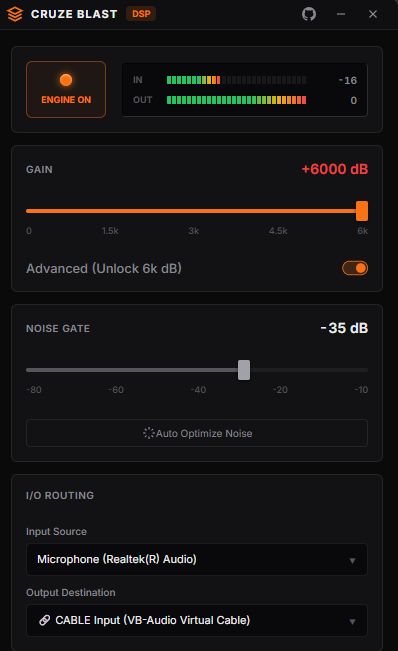
How to Boost Your Microphone Volume in 3 Steps
Set up Cruze Blast mic booster and get a fully amplified microphone in under two minutes. Works with Discord, OBS, Zoom, and any Windows app.
Install VB-Cable Virtual Audio Driver
Download the free VB-Cable virtual audio driver. Run the installer as Administrator and reboot. This creates a virtual microphone that Cruze Blast routes your amplified mic audio into.
Launch Cruze Blast & Route Your Microphone
Open Cruze Blast. Set your Input Source to your real microphone and Output Destination to "CABLE Input (VB-Audio Virtual Cable)". Hit the power button and drag the gain slider to boost your mic volume.
Set Discord or Game Input Device
In Discord → Voice & Video settings, change your Input Device to "CABLE Output (VB-Audio Virtual Cable)". Turn off Discord's built-in noise suppression — Cruze Blast's smart noise gate already handles background noise removal. You're live with a boosted mic.
Frequently Asked Questions
Common questions about using Cruze Blast microphone amplifier.
How do I boost my microphone volume on Windows?
Download Cruze Blast, a free real-time microphone amplifier for Windows. It boosts your mic volume up to 6000 dB using DSP audio processing with zero latency. Install VB-Cable, route your mic through Cruze Blast, and set your Discord or game input to the virtual cable output. It works on Windows 10 and Windows 11.
What is the best free microphone booster for Discord?
Cruze Blast is the best free mic booster for Discord. It provides up to 6000 dB of gain, a smart noise gate that automatically removes keyboard clicks and background noise, a soft-clip limiter to prevent audio distortion, and under 5ms latency. It's a single portable EXE — no installation needed.
How do I fix a quiet microphone on Windows 10?
To fix a quiet microphone on Windows 10 or 11, use Cruze Blast — a free mic volume booster. Download the portable EXE, install the free VB-Cable virtual audio driver, set Cruze Blast's input to your microphone and output to VB-Cable, then set your app's input device to CABLE Output. Drag the gain slider to amplify your mic up to 6000 dB.
Is Cruze Blast free to use?
Yes, Cruze Blast is completely free. You can get a free license key by joining the Cruze Blast Discord server. The software is a single portable EXE file with no installer, no dependencies, and no subscription fees.
Does Cruze Blast add latency to my microphone?
No. Cruze Blast uses a WASAPI low-latency audio pipeline with a 512-sample block size at 48kHz, resulting in under 5 milliseconds of latency. This is imperceptible and faster than most hardware audio interfaces. Your voice reaches Discord or your game almost instantly.
Download Cruze Blast — Free Mic Booster
Grab the latest release of the best free microphone amplifier for Windows. Single portable EXE, under 40MB. No installer required. Compatible with Windows 10 and Windows 11 (x64).